Why most people buy the wrong charger
Wireless chargers all look alike in photos: a sleek pad or stand, a glowing ring, a phone resting at a photogenic angle. The differences that matter — charging speed under real conditions, heat management, and multi-device support — never show up in the product shot. This guide covers what to check before you buy.
1. Wattage is a ceiling, not a promise
A "15W" charger delivers 15 watts only when your phone supports it, the coil is aligned, and the power adapter behind it is strong enough. Many cheap hubs ship with a 10W adapter that silently caps the whole system.
What to look for: 15W output with an adapter rated at 20W or higher included in the box — or clearly listed adapter requirements.
2. Count the real charging spots
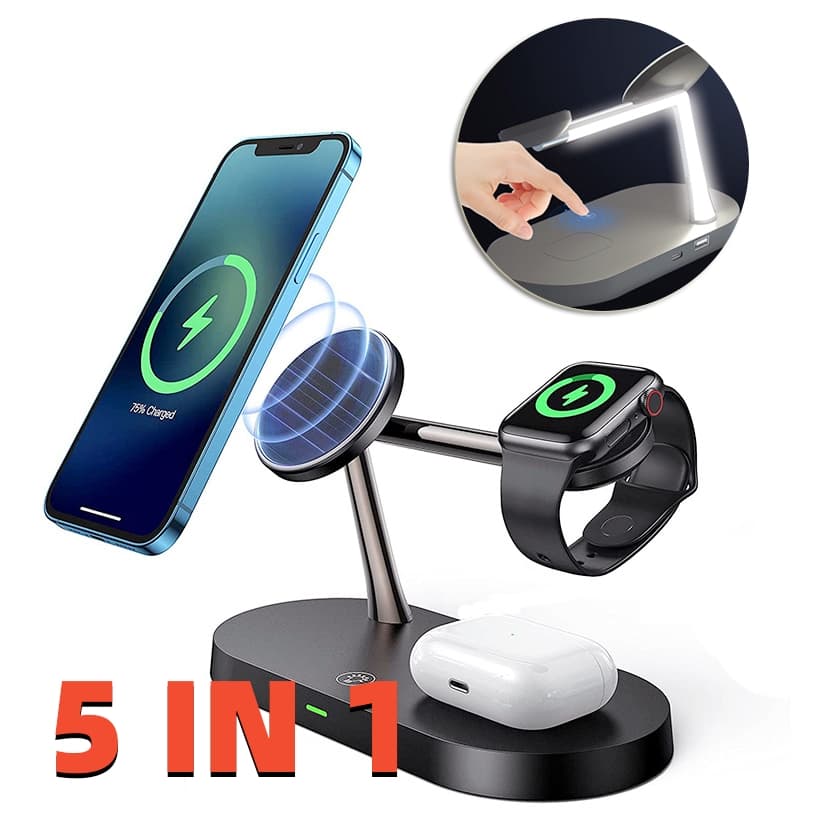
"5-in-1" sometimes means two real charging coils plus a USB port and two slots that just hold things. If you charge a phone, a smartwatch, and earbuds nightly, you want three genuine outputs: 15W for the phone, ~3W for the watch, ~2W for the buds.
What to look for: A spec sheet that lists a wattage per position. If a position has no wattage, it's a shelf.
3. Heat management decides battery lifespan
Wireless charging generates more heat than cable charging, and sustained heat is the number-one battery killer. Quality hubs include over-temperature protection and space the coils away from each other.
What to look for: Explicit over-current, over-voltage, and over-temperature protection. Our 5-in-1 Wireless Charging Station includes all three.
4. The night-light question
It sounds like a gimmick until you own one: a touch-dimmable light on a bedside charger replaces a lamp and makes midnight water runs safer. If the hub lives on a nightstand, prioritize a light with a genuinely dim lowest setting.
5. Skip these "features"
Ready to upgrade your nightstand? Browse our Tech Accessories collection — every charger we stock lists real per-position wattage and full safety protections.